Category Archives: Maven

Maven Booted My Spring App Fine. IntelliJ Didn’t. Here’s the One-Checkbox Fix.

The setup: A Spring Boot service that booted perfectly with mvn spring-boot:run, but crashed immediately when launched from IntelliJ’s Run/Debug configuration — same code, same machine, same dependencies.

The error:
  Exception in thread "main" org.springframework.beans.factory.BeanDefinitionStoreException:
  Failed to read candidate component class: ...
  Caused by: java.lang.IllegalArgumentException: Could not find class [com.azure.cosmos.models.CompositePathSortOrder]
  Caused by: java.lang.ClassNotFoundException: com.azure.cosmos.models.CompositePathSortOrder

Spring’s classpath scanner hit an annotation referencing a class that, according to the JVM, didn’t exist.

First instinct — wrong: This looked like a version conflict. My local Maven repo had several versions of the library in question cached side by side, so a mismatch seemed like the obvious suspect. It wasn’t. Every version was internally consistent; the class was exactly where it should be.
Finding the real cause: Instead of guessing further, I asked Maven directly where this dependency actually comes from:

mvn dependency:tree -Dincludes=

The output told the whole story in one line:

  my-app
  \- some-transitive-library:jar:x.y.z:provided
     \- the-missing-library:jar:x.y.z:provided

provided scope. That’s Maven’s way of saying: “this dependency is needed to compile against, but something else — a container, an app server, the deployment environment — supplies it at runtime. Don’t bundle it.”

Why the two tools disagreed:

  • mvn spring-boot:run treats the JVM it launches as that “runtime environment,” so it includes provided-scope dependencies on the exec classpath.
  • IntelliJ’s Run Configuration does not include provided-scope dependencies by default — and that’s the correct, intentional behavior for the scope’s contract. It’s not a bug; it’s IntelliJ doing exactly what provided is supposed to mean.

    Same POM, same dependency graph, two different — both legitimate — interpretations of one Maven scope.
    The fix, once the cause was clear, took ten seconds: open the Run/Debug Configuration, click Modify options, and enable:

       
      "Add dependencies with 'provided' scope to classpath"
    

    No POM edits. No version pinning. No cache invalidation. Rerun — boots clean.

    The lesson, generalized: When a Maven-launched app and an IDE-launched app disagree on a missing class that genuinely exists in your dependency tree, don’t reach for version conflicts first. Check scope. mvn dependency:tree -Dincludes= will show you exactly which dependency brought a class in and under what scope — that single fact usually explains the whole discrepancy, and the fix is often a checkbox, not a rebuild.
  • Code Structure Analysis Tool

    I received a dump of Java codebase which had multiple modules and I needed to analyse it’s structure. The following tool did quite a good job:

    https://github.com/gdela/socomo

    Basically the idea is to run it inside a Java project using a maven command and it creates HTML file which denotes the high level structure of the code.

    Note: Stan4J is also a very good tool which does similar job but allows deeper analysis (upto 500 classes only)

    Maven and Eclipse Issues

    I use Maven for almost all Java projects I work in. I prefer using Netbeans with Maven as it has solid integration with Maven and I find it a hassle free approach of working with Maven without cluttering up your project with ‘special’ project files. However I have found out that Eclipse cannot be ignored as it has much faster performance and it needs lesser memory than Netbeans. So here are some tricks to work around the build issues I have faced with Eclipse when combined by Maven. The usual issue I faced was that I could build my project from console but I saw lots of build issues when building from inside Eclipse and lot of build errors were logged inside Eclipse ‘Problem’ view.

    Refresh Project On pom.xml change
    If you have changed anything in the pom.xml you should refresh your Eclipse project. It is possible Eclipse will pick up your changes from pom.xml and resolve any build / dependency issue in this step itself.

    Re-generate Eclipse Project Files
    If you have added a dependency in pom.xml you should ensure that the following commands are executed to regenerate the Eclipse project configuration files.

    mvn eclipse:clean
    This will delete the .project, .classpath and .settings folder of Eclipse.

    mvn eclipse:eclipse
    This will regenerate the .project, .classpath and .settings folder for your project.

    Once you execute the above commands go back to your Eclipse project and refresh your project by right clicking on the project and clicking on refresh in the context menu or by pressing the ‘F5’ key after selecting the project.

    In my experience so far Eclipse is able to resolve all dependence / build issue and you should have a trouble free coding experience now.

    Production helper utility for Java team

    I have been thinking about going through some of these tools to get more productive in deploying / delivering Java based web apps to the team:

    Drop Jar is a helpful tool to share jar files.

    Drop Wizard is a helpful tool for delivering production read jar files.

    Spring Boot allows developers to create web apps easily using convention over configuration.

    Shade Plugin allows a Maven based build to overcome duplicate / incompatible versions of libraries. If you have been bitten by incompatible log files you know what I mean.

    Eclipse Maven – Download Sources and JavaDoc

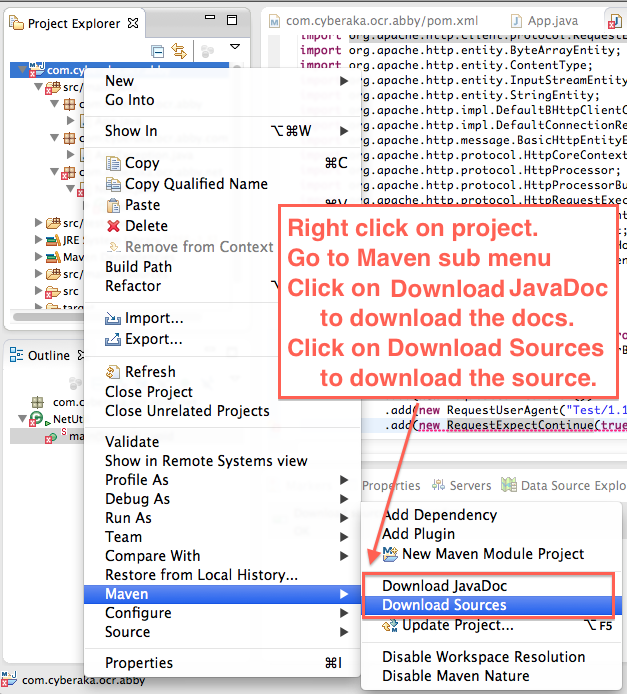
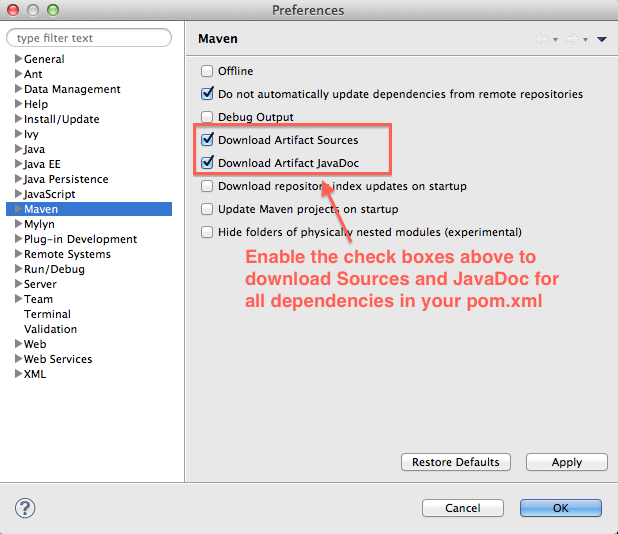
    Eclipse Maven integration has improved quite a bit and I find it somewhat comparable to the excellent Maven integration provided by Netbeans. I recently required to debug third party jars and I needed their sources for this purpose and as a general practice I always download the javadoc for any third party library I use. This is easily done in Eclipse using the following approach.

    Do it per project

    Eclipse Maven Context Menu for Project

    Eclipse Maven Context Menu for Project

    Do it for all projects

    Eclipse Maven Properties Dialog

    Eclipse Maven Properties Dialog